Vertical Mice

Ringel05

Diamond Member
Joined
Aug 5, 2009
Messages
63,412
Reaction score
21,164
Points
2,250
Location
Duke City
Been using vertical (ergonomic) mice for about a year now. Took a little muscle memory retraining but once I got used to it I'll never go back to a standard mouse. Much easier on the wrist, more natural position for the hand and wrist.

iu


They make left handed ones also, I mouse left handed.

The best rated one is the Logitech MX Vertical but it's expensive and I'm not sure if they make a left handed one. I'm using Perixx wireless verticals but they have developed some "sticking" and lag so I'm going with a wired version for $12. The Perixx looks just like the Anker mouse shown above.

This is the MX Vertical, it is rechargeable.

iu
 
Mice? Who still uses a mouse? I haven't used a mouse in about +20 years.

Pros use a Trackball.


Wireless-trackman-mouse.webp
 
Another highly rated vertical mouse, they make both right and left handed ones is the Evoluent Vertical mouse but it too is expensive like the Logitech, almost $100.

iu
 
The first thing I do is learn the keyboard shortcuts for an application.

It typically cuts down on my reaching for a mouse by about - if I was to make an educated guess - 75-80 percent.

For example, on our HR/Payroll system most of my work mates:
1. Use the mouse the click the search function.
2. Use the mouse to click on the EEID field.
3. Enter an EEID.
4. Use the mouse to click the Accept button.
5. Use the mouse to click the Detail button.
6. Use the mouse to click an item in the list to take them to the Pay record.

I press CTRL+F to enter find mode, tab once to the EEID field, enter the ID, hit the ENTER key, press ALT-D to open the Detail list, Down arrow twice to the pay option, press ENTER.

Sometimes ya just gotta use a mouse, but if people learned to use keyboards efficiently they can be much more productive.

Just say'n.

:)
.
.
.
.WW
 
Meh -- I prefer mice to be horizontal. That's why I have a cat.
 
The first thing I do is learn the keyboard shortcuts for an application.

It typically cuts down on my reaching for a mouse by about - if I was to make an educated guess - 75-80 percent.

For example, on our HR/Payroll system most of my work mates:
1. Use the mouse the click the search function.
2. Use the mouse to click on the EEID field.
3. Enter an EEID.
4. Use the mouse to click the Accept button.
5. Use the mouse to click the Detail button.
6. Use the mouse to click an item in the list to take them to the Pay record.

I press CTRL+F to enter find mode, tab once to the EEID field, enter the ID, hit the ENTER key, press ALT-D to open the Detail list, Down arrow twice to the pay option, press ENTER.

Sometimes ya just gotta use a mouse, but if people learned to use keyboards efficiently they can be much more productive.

Just say'n.

:)
.
.
.
.WW
I'm disabled and retired, why do I need to be productive.........? :eusa_whistle:
 
I'm disabled and retired, why do I need to be productive.........? :eusa_whistle:

Oh, whatever floats your boat. Just pointing out an investment in some time can have great results.

However, I hope to join you in about 5 years. Ah - the retired part, not the disabled part. :))

.
.
.
.WW, PHS
 
I'm disabled and retired, why do I need to be productive.........? :eusa_whistle:

Oh, whatever floats your boat. Just pointing out an investment in some time can have great results.

However, I hope to join you in about 5 years. Ah - the retired part, not the disabled part. :))

.
.
.
.WW, PHS
I know, just giving you a ration of s**t... :D
 
The first 'ergonomic' MS keyboard I bought in 1994 or so still works fine, and has outlasted about 8 mice, and yes, the hardwired mice are much better than the wireless, but so is everything else hardwired, including music systems; bluetooth and the like sucks, too, which is why I spent the bucks on a good mid-range DAC and high impedance headphone and headphone amplifier, and now searching for a multi-format HD CD player.
 
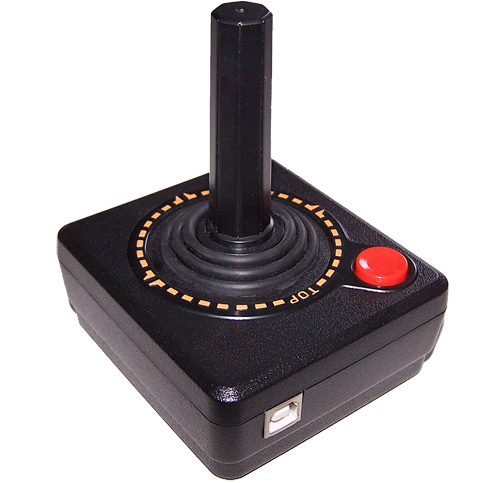
Been using this for years ... works just fine

usb_joystick.jpg
 
15th post
Interesting, I have never seen one of those. You are right about a regular mouse, it forces you to sort of suspend your arm so it tires your wrist. I'll have to check this out.

For years I use one of these:
Benefits-of-an-Ergonomic-Keyboard-benefits.webp


Not this one of course, but similar. Same thing, it took some retraining to use, but once you get use to it, it is far superior to a regular keyboard.
 
Interesting, I have never seen one of those. You are right about a regular mouse, it forces you to sort of suspend your arm so it tires your wrist. I'll have to check this out.

For years I use one of these:
View attachment 310822

Not this one of course, but similar. Same thing, it took some retraining to use, but once you get use to it, it is far superior to a regular keyboard.
I have a Logitech K350 wave board. Bought it online, didn't realize there wasn't any backlighting or Cap Lock indicator light. It's connected to the Gamer so most of the keys never get used. I also never use the number pad on the right so I'm considering an Apple "style" keyboard without the number pad.
 
Back
Top Bottom