Saving an image posted on USMB

odanny

Diamond Member
Gold Supporting Member
Joined
May 7, 2017
Messages
25,439
Reaction score
20,811
Points
2,290
Location
Midwest - Trumplandia
So if someone posts an image, say something they found photoshopped on the web somewhere, and you want move this image elsewhere, the file extension is .web instead of .jpg, which means you can't do that. I tried downloading one image and it said I did not have the application to open the download (yes, I know, I could probably get that, but anyway)

Is there some kind of workaround for this?

The .web images is what all the paywall news outlets use so you cannot share their images, is that also what this message board does?
 
So if someone posts an image, say something they found photoshopped on the web somewhere, and you want move this image elsewhere, the file extension is .web instead of .jpg, which means you can't do that. I tried downloading one image and it said I did not have the application to open the download (yes, I know, I could probably get that, but anyway)

Is there some kind of workaround for this?

The .web images is what all the paywall news outlets use so you cannot share their images, is that also what this message board does?
I simply click the image on my phone and hit download. Sometimes the image won't work on another thread, so then I just run it though the im meme generator and download that for posting.
 
So if someone posts an image, say something they found photoshopped on the web somewhere, and you want move this image elsewhere, the file extension is .web instead of .jpg, which means you can't do that. I tried downloading one image and it said I did not have the application to open the download (yes, I know, I could probably get that, but anyway)

Is there some kind of workaround for this?

The .web images is what all the paywall news outlets use so you cannot share their images, is that also what this message board does?

Post a link to an example, let's see what I can do.
 
I use my phone almost exclusively.
I usually take a screenshot then crop it
 
I have never done USMB or any other message board on my phone so I don't have any experience with that. All the photos I post I can easily copy and repost elsewhere. But I use a desktop PC or my laptop to communicate here so. . .
 
I simply click the image on my phone and hit download. Sometimes the image won't work on another thread, so then I just run it though the im meme generator and download that for posting.
That is what I do.

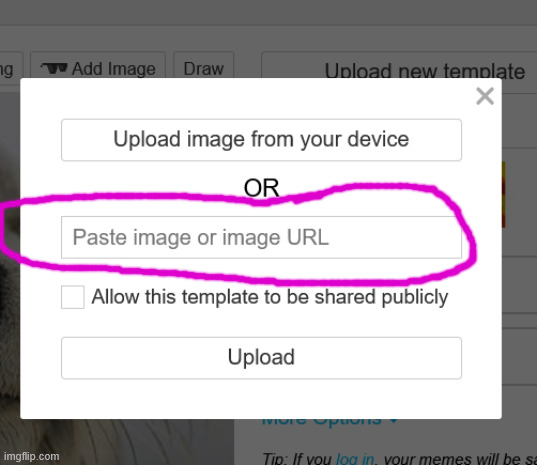
It got even easier when I discovered the imgflip site allows you to paste image screenshot copied captures right into the meme field.

No more downloads, no more cluttering up my device.


It takes not even a second to capture an image, paste it into the field on another tab, and boom, done.
9v1zey.jpg
 
imo?

Listen to Beale. If anyone's specialty is c & p?

It's his. :thup:

Full credit due, and all that. :blues:
 
If you're using a phone I don't know what to do, if you're using a laptop just right click and save the image. Then go find it, open with paint, and then save as file type .jpg.
 
This is the image I was talking about, I saved to my "photos" on my Mac and the file is saved as .webp instead of .jpeg, but I can still share it here.


IMG_1005.webp


Now this is saving the image to imgflip and it posts here as a .jpeg

9v37ud.webp
 

New Topics

Back
Top Bottom